
Product Overview
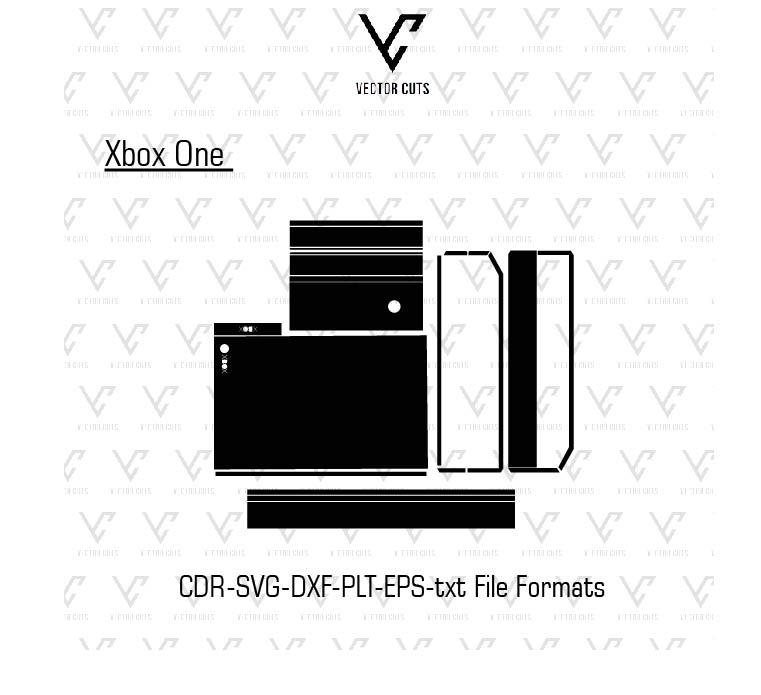
This Xbox One Vinyl Skin Template Vector by VectorCuts VectorCuts professionally-designed digital cut template that was created to assist in making customized vinyl skins for Xbox One controllers and gaming consoles. This template gives exact vector outline that permit designers as well as vinyl companies and DIY artists to design perfect-fit skins swiftly and easily.
Instead of manually measuring the console or drawing shapes of the console This template comes with cuts that can be cut that are precise dimensions of Xbox One consoles. Designers are able to easily apply customized designs, textures, and colours to design distinct skins. They can then cut them out using an automated vinyl cutter.
If you run an personalized gaming skin shop, a vinyl printing firm, or need to customize the appearance of your Xbox One console the template can make this process much easier and professional.
Product Description
It is the Xbox One Vinyl Skin Template Vector is a digital design format specifically created for designers to create unique vinyl skins that can be used for Xbox One controllers and consoles. This template has precisely calculated outlines of device areas to make sure that the skins are properly placed over vents, buttons, ports as well as edges.
This template removes the requirement for complex measures and manual tracing. Designers simply need to start the template with the program of their choice and begin creating customized designs for their device.
As it is vector-based, it’s able to be modified, enlarged and customized with no loss of the quality. It allows the user to play using various designs, such as games-related artwork, textures and minimalist colours, as well as logo design.
The template can be used for both cut-only workflows and print-and-cut workflows and is suitable for both professional and non-professional vinyl firms and hobbyists using home-based cutting equipment.
Clean vector paths and layers that are well-organized The Xbox One Vinyl Skin Template by VectorCuts simplifies the whole procedure starting from creation to cutting, and installation.
Key Features
* 100% accurate Xbox One measurement of the device
* Vector cut paths that are clean to allow for accurate cutting
• Fully editable design layers
* Compatible with all major design software
* Intended for vinyl cutting machines
Ideal for workflows that require print and cut.
* Instant digital download
Ideal for personal as well as commercial uses
File Formats Included
This Xbox One Vinyl Skin Template download contains multiple vector file formats that ensure the compatibility of different design programs and cutting equipment.
Formats that are included may comprise:
* AI (Adobe Illustrator)
* EPS
* SVG
* DXF
* PDF
This format makes it easier for designers to work virtually any designing environment.
Compatible Design Software
The template is open and modified using a variety of popular software programs for designing, such as:
* Adobe Illustrator
* CorelDRAW
* Inkscape
* Cricut Design Space
* Silhouette Studio
The programs let users modify the templates and create patterns for cutting vinyl.
Compatible Cutting Machines
The Xbox One Vinyl Skin Template works well with all vinyl cutting equipment that are used in the business.
Compatible machines include:
* Cricut Maker
* Cricut Explore Series
* Silhouette Cameo
* Silhouette Portrait
* Graphtec cutters
* Roland vinyl cutters
* GCC cutters
The machines are able to precisely adhere to the cut lines of templates in order to create exact and clean vinyl skins.
How the Xbox One Skin Template Works
Utilizing the template is easy and for the beginner.
Step 1 – Download the Template
Once you have purchased the XBox game vinyl skin template from VectorCuts, after purchasing the template, save the file on your computer.
Step 2 – Open in Design Software
Start the vector templates within your favorite design program.
Step 3 – Create Your Design
Customize the artwork or colors, textures or patterns onto the template.
Step 4 – Prepare the Cut File
Cut lines should be separated and the layer of design in order to assure accurate cutting.
Step 5 – Cut the Vinyl
The cut path is sent to the vinyl cutter to cut the vinyl pieces.
Step 6 – Apply the Skin
Be sure to align the vinyl pieces and then apply the pieces to the Xbox One device to give it a perfect surface.
Compatible Vinyl Materials
The template can be used using a variety of vinyl material based upon the look you’d like.
Matte Vinyl
It provides a non-reflective and smooth appearance that is sleek and contemporary.
Gloss Vinyl
It gives a sparkling appearance and highlights vibrant patterns.
Carbon Fiber Vinyl
An extremely popular choice among gamers due to the fact that it offers a console an elegant gaming appearance.
Brushed Metal Vinyl
It gives a metallic and the appearance of high-tech.
Printable Vinyl
It allows users to print customized designs prior to cutting the skin.
Benefits of Using Xbox One Vinyl Skins
Protects Your Console
Skins made of vinyl help shield Xbox One’s Xbox One surface from scratching dust and wear.
Custom Appearance
Gamers are able to personalize their console with exclusive patterns and colors.
Easy to Remove
Vinyl skins of high-quality are able to be safely removed without causing damage to the gadget.
Great for Business
Created custom Xbox One skins are highly sought-after by gamers. They can be purchased on websites or in printing stores.
Popular Xbox One Skin Design Ideas
The designers often design skins that are that are influenced by gaming culture and aesthetic trend. A few of the most popular concepts are:
* Gaming patterns that are futuristic
* Gaming texture in RGB style
* Minimalist solid color skins
* Animation or pop culture art
* Camouflage or carbon fiber designs
They are extremely appealing to gamers.
Instant Digital Download
Microsoft’s Xbox One Vinyl Template is accessible in an instant download after purchase has been completed. It means that you can begin creating and cutting out skins right away.
They are editable and work with all professionals’ design tools as well as cutters for vinyl.
FAQs
What is the Xbox One Vinyl Skin Template Vector?
It’s a vector that can be used to design as well as cut out vinyl skins to Xbox One controllers and consoles.
Does this product come in a tangible form?
No. The product you purchase is it’s a electronic download of a template and not a real vinyl skin.
What kind of software do I need to edit my template?
You can use Adobe Illustrator, CorelDRAW, Inkscape, Cricut Design Space, and Silhouette Studio.
Are there any templates that can be used by beginners?
Yes. It has layers organized with clear cut lines making it simple to work with.
Which cutting equipments will work with them?
It works with various equipment like Cricut, Silhouette, Graphtec, Roland, and various other vinyl cutters.
Are there any skins that I can sell using this template?
Yes. You are able to design and market customized vinyl skins, after incorporating your own design.
Final Thoughts
This Xbox One Vinyl Skin Template Vector created by VectorCuts is an effective instrument for artists, designers, business owners, and gamers looking to design unique skins specifically for Xbox One devices.
This template comes with precision measurements, customizable vector layers and compatibility with cutting equipment it simplifies the creation of high-quality vinyl skins. You can personalize your gaming console, or start a company selling customized templates, this one is an efficient and reliable solution.
Reviews
There are no reviews yet.