
Product Overview
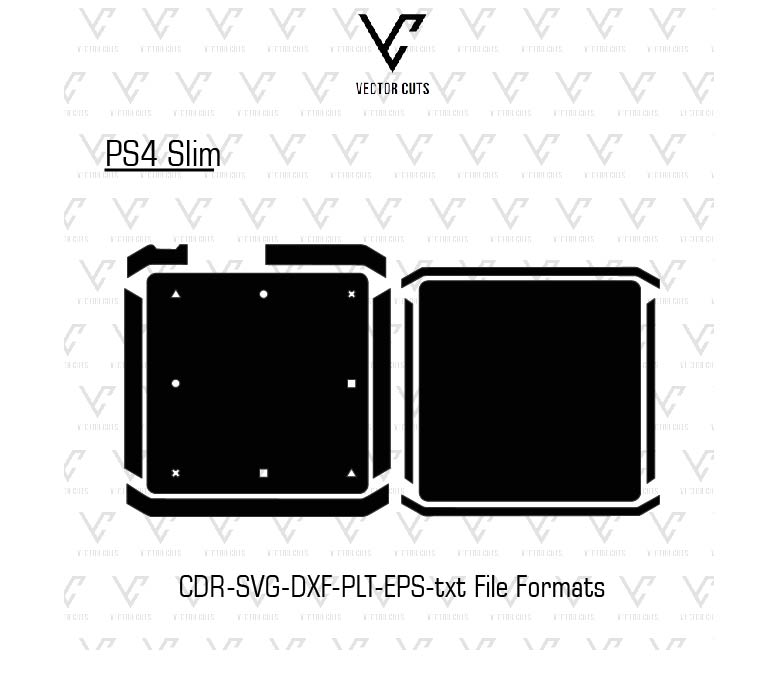
This PlayStation 4 Slim Vinyl Skin Template created by VectorCuts is a professionally-designed digital cut template that is designed to make personalized vinyl skins to be used on PlayStation 4 Slim consoles and handhelds. The template offers precise vector lines that permit the designers, companies that work with vinyl, as well as DIY designers, to design skins that are perfectly suited to every aspect of the gadget.
Instead of measuring manually the device, or drawing lines using scratch This template gives an easy-to-use and precise cut lines. It helps design cutting, printing and designing top-quality vinyl skins quicker and much more effective.
No matter if you’re running your own tailor-made skinshop, business that prints vinyl or even designing skins. This template will simplify the procedure and ensures high-quality output.
Product Description
PS4 Slim Vinyl Skin Template Vector is a digital template designed to assist creators create customized vinyl skins that can be used on PlayStation 4 Slim consoles. Every template is meticulously calibrated to meet the device’s exact measurements, which ensures a flawless fitting around buttons, vents, screen, and the edin creating his template will allow you to avoid drawing or taking measurements of your gadget. The template lets you be focused on constructing distinctive styles using art. As it’s vector-based it can be customizable and scalable without sacrificing the quality.
This template can be used with many popular design software such as:
- Adobe Illustrator
- CorelDRAW
- Inkscape
- Cricut Design Space
- Silhouette Studio
After you have your design done, you are able to cut your vinyl with appropriate cutting equipment or apply it with the print-and-cut process to create flawless, high-end skins.
Why Use a PlayStation 4 Slim Vinyl Skin Template?
Making vinyl skins with no template could be tedious and inaccurate. Templates that are professionally designed offer several benefits:
Accurate Device Measurements
Every template is created using precise measurements that make sure that buttons, ports and panels are exact.
Saves Time
Do not bother with the measurement manual and begin designing right away.
Easy to Customize
It is possible to add patterns, colors, designs, textures, logos, or images directly onto the template.
Professional Results
Templates will ensure that the vinyl skins you choose to use look professional and polished, even for novices.
Ideal For Designers and Businesses
This PS4 Slim Vinyl Skin Template is the perfect fit for many different viewers:
Vinyl Skin Businesses
Increase your catalog of products by providing customized PlayStation 4 Slim skins for gamers.
Graphic Designers
Designers can create game-themed skins or pop-culture-inspired ones by using the templates.
Print Shops
Print shops are able to include highly-demanding game Skins to their products without having to spend hours measuring equipment.
DIY Creators
Vinyl hobbyists are able to create customized PlayStation skins for their own PlayStation 4 Slim consoles.
Compatible Design Software
This template is fully compatible in conjunction with the majority of design software:
- Adobe Illustrator – completely editable vector templates
- CorelDRAW is perfect for production in large format
- Inkscape is a free as well as open source vector editor
- Cricut Design Space is now ready for cutting vinyl
- Silhouette Studio is suitable for cutting with precision
Compatible Cutting Machines
PlayStation 4 Slim Vinyl Skin Template is suitable for use with all vinyl-cutting machines:
- Cricut Maker / Cricut Explore
- Silhouette Cameo / Portrait
- Graphtec cutters
- Roland vinyl cutters
- GCC cutters
So, whether it’s small batches of production or larger quantities, your vinyl cuts you make are precise and clear.
File Formats Included
The template is available in multiple format vector files to make it more flexible:
- AI (Adobe Illustrator)
- EPS (Encapsulated PostScript)
- SVG (Scalable Vector Graphics)
- DXF (Drawing Exchange Format)
- PDF (Vector Preview)
The formats allow you to upload, edit, and cut with a variety of tools and programs.
How the PlayStation 4 Slim Vinyl Skin Template Works
Step 1 – Download
Download and purchase the digital design from VectorCuts.
Step 2 – Open
The vector file can be opened within your design software of choice.
Step 3 – Design
Include your images, textures, and color to design an original PS4 Slim skin.
Step 4 – Prepare for Cutting
Remove the cut lines and the layer of design in order to assure precision.
Step 5 – Cut Vinyl
Utilize your machine for cutting vinyl to cut your parts according to the templates.
Step 6 – Apply Skin
Apply the vinyl cautiously to the PS4 Slim device, smoothing air bubbles to give the perfect appearance.
Compatible Vinyl Materials
The template is compatible with a range of vinyl materials.
- Matte Vinyl – smooth, non-reflective finish
- Gloss Vinyl – shiny, vibrant colors
- Carbon Fiber Vinyl Gaming with a premium style
- Brushed Metal Vinyl Metallic effect for technological design
- Printawithinyl: Print your own designs prior to cutting
Benefits of Using PlayStation 4 Slim Vinyl Skins
Protects the Device
It helps prevent scratches, scuffs and marks.
Personalization
Lets players personalize their consoles by adding colours, textures and images.
Removable
Vinyl skins of high-quality are able to be cleaned without leaving any residue.
Enhances Appearance
Changes the look of your console to a Let’sant, original gaming set-up.
Popular PlayStation 4 Slim Skin Design Ideas
- Gaming-themed skins. These include RGB designs, futuristic styles, or cyberpunk-themed graphics.
- Simple Skins with solid colors or soft textures
- Anime & Pop Culture Character designs that are popular and graphic designs for fandoms
- Custom branding Logos for companies or for tournaments
Instant Digital Download
After purchase, the design can be downloaded for download as the online download, which means you can begin designing right away.
They are editable i.n full and suitable for most vinyl cutting machines.
FAQs
What is the PlayStation 4 Slim Vinyl Skin Template Vector?
The template is a digital vector layout to design and cut vinyl covers for PS4 Slim consoles.
Does this product come in a tangible form?
No. It’s a digital download, but not a real vinyl skin.
Which software should I choose to use?
Adobe Illustrator, CorelDRAW, Inkscape, Cricut Design Space, Silhouette Studio.
Do beginners have the ability to use it?
Yes. Clean layers cutting lines that are vector-based, help beginners get started.
What machines for cutting can be used?
Cricut, Silhouette, Graphtec, Roland, GCC, and many other vinyl cutters.
Are there any skins that I can sell with this template?
Yes. You are able to create and market customized vinyl skins with your personal design.
Final Thoughts
This PS4 Slim Vinyl Skin Template Vector, created by VectorCuts is an essential item for artists, businesses that use vinyl as well as gamers.
With exact measurements, easily editable vector layers, and flexible compatibility, making customized PlayStation 4 Slim skins is simple, fast, and professional. Secure and personalize your PlayStation 4 Slim Edition, while also giving it a distinctive look that’s distinctive.
Get started today to design and turn the PlayStation 4 Slim device into the ultimate game masterpiece.

Reviews
There are no reviews yet.