
Product Overview
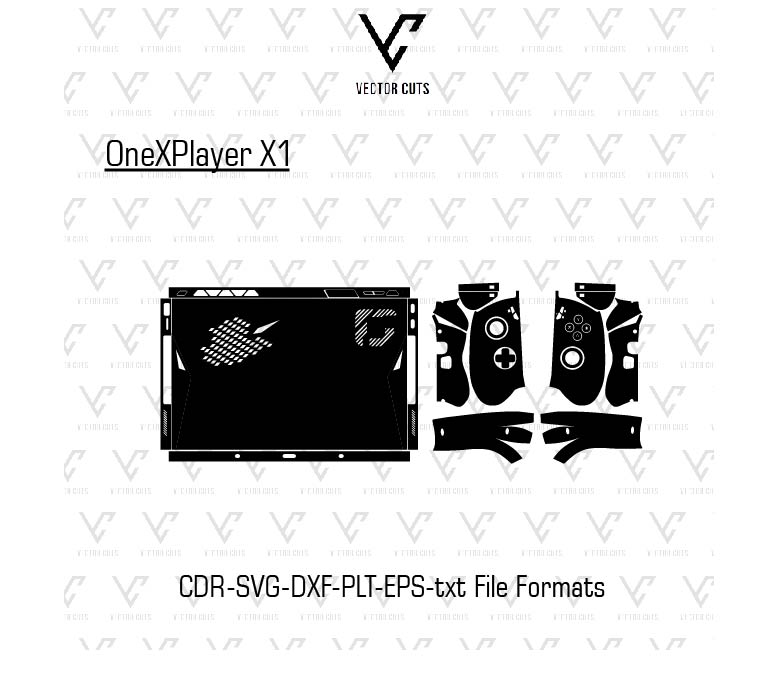
This OneXPlayer X1 Vinyl Skin Template by VectorCuts is a professionally-designed digital cut file that is designed for creating custom vinyl skins designed for OneXPlayer X1 handheld gaming consoles. This template is precise in its outline vectors that enable creators, vinyl installers,, as well as printing companies to design perfect fitting skins swiftly and effectively.
Instead of measuring the machine the device, this template offers precise dimensions as well as clean cutting paths that make it easy to print, design, and cut top-quality vinyl skins with machines such as Cricut, Silhouette, Graphtec and Roland cutters.
The design is suitable for companies that sell vinyl skins, graphic artists, print shops, and even DIY artists who want to develop exclusive gaming device skins or increase their catalog of products by incorporating OneXPlayer X1 skins.
Fully editable vector layers as well as design zones that are organized, users are able to apply customized graphics as well as textures, colors, or logos while ensuring that your skin is sized exactly.
The template can streamline the process beginning with the design stage to cutting, and then the application to reduce time as well as making production more accurate.
Product Description
This OneXPlayer X1 Vinyl Skin Template Vector is a highly precise digital design template designed specifically for the purpose of creating customized vinyl skins to fit the OneXPlayer X1 handheld gaming console. The design template has been carefully calculated to outline of the device’s external area, making sure that the designs cut with the template are aligned correctly to the buttons, areas of the screen as well as grips and edges.
The template was designed with the professional production of vinyl with an eye towards professional production template permits designers to effortlessly apply designs, patterns, or patterns within designated design areas. Because it is vector-based it’s possible to be edited and resized without loss of quality. This makes it suitable for novice artists and professionals working in production.
The template can be used with a vast variety of design tools, such as Adobe Illustrator, CorelDRAW, Inkscape, Cricut Design Space and Silhouette Studio. This allows for seamless compatibility with all vinyl cutting equipment and workflows that print and cut.
When the design is complete and the design is completed, customers can then forward the cut lines into their cutting machines to make precise vinyl skins. The skins may then be placed on the OneXPlayer X1 device to give the surface a an individual look, and protect the splay from everyday wear and scratches..
If you run a customized skin shop, manufacturing custom prints or just making skins for your personal use The OneXPlayer X1 Vinyl Skin Template Vector created by VectorCuts is an efficient and reliable option for creating high-quality gaming skins for your device.
Key Features
* High-precision OneXPlayer devices measurements
* Optimized and cleaned vector cut paths
Design layers that can be fully edited
* Ideal for vinyl cutting machines.
* Compatibility with the most popular design software
• Suitable for workflows that require print and cut.
* Instant digital download
* Appropriate for personal and commercial endeavors
File Formats Included
The template is available in a variety of professional vector formats to guarantee compatibility with a variety of cutters and programs.
The formats that are included may include:
* AI (Adobe Illustrator)
* EPS
* SVG
* DXF
* PDF
These templates make it simple to include the template in any cutting process.
1. Download the Template
When you purchase the vector template through VectorCuts, you’ll receive an immediate digital download that contains the vector file. You can save the files on your computer and download them, if included in a compressed file.
2. Open the File in Design Software
Use the template in the most professional design software, like Adobe Illustrator, CorelDRAW, Inkscape, Cricut Design Space, or Silhouette Studio. It has layers organized which make it easier to recognize cut lines as well as areas for design.
3. Add Your Custom Design
After you have the template open and you are able to begin creating the vinyl skin. Designers are able to apply for:
- Solid color skins
- Carbon fiber texture
- Gaming themed artwork
- Animation or pop culture graphics
- Logos for custom brands
- Patterns that conceal or are abstract
As the file format is vector-based, designs are clear and easy to scale.
4. Prepare the File for Cutting
Once you’ve finished your design make sure to keep your cut layer separated from the art layer. Cut the path on the cutting device on your vinyl while creating the design on vinyl if working with a print and cut process.
5. Cut the Vinyl Skin
The vinyl material should be loaded into the cutting machine, and let the machine cut the pieces of skin in accordance with the outline of the template.
6. Apply the Skin to the Device
After cutting, you can remove the vinyl excess and then carefully attach the skin onto the OneXPlayer X1 device. A proper alignment will give you polished and sleek appearance.
This process allows you to make high-end skins with just a few just a few minutes.
Why Buy Device Skin Templates from VectorCuts
VectorCuts is a specialist in the creation of precise templates for customized wraps and skins that make it an essential supplier for both vinyl companies.
Accurate Device Measurements
Each template is created with meticulously measured dimensions of the device to ensure that skins are aligned perfectly with buttons, screens and edges.
Professional Vector Quality
The templates all have smooth vector paths that aid vinyl cutters make precise and smooth cuts.
Optimized for Cutting Machines
VectorCuts templates are designed to be compatible with the following machines:
- Cricut
- Silhouette
- Graphtec
- Roland
- GCC cutters
This guarantees a reliable performance throughout the cutting process.
Easy-to-Edit Files
These templates can be edited in full and allow designers to alter color, texture, as well as artwork.
Saves Time and Effort
Instead of manually measuring the devices it provides templates with pre-designed cut paths that allow designers to concentrate on their creativity rather than technical set-up.
Ideal for Businesses
If you own the operation of a customized vinyl printer or skin store or service, VectorCuts templates allow the expansion of your selection and provide skins for a variety of gadgets.
Design Tips for Creating Professional Gaming Skins
The creation of skins for gaming gadgets such as the OneXPlayer X1 can be fun and lucrative. Here are some strategies to make styles that are distinctive.
Use High-Resolution Graphics
Use high-resolution art when creating skins. The final printed skin appears impressive and professional.
Make sure important elements are kept away from the Edges
Be sure to avoid placing graphics or texts near edges cut such as buttons, curves or edges. This will help prevent distortion of the image when installing.
Follow the Template Guidelines
Utilize your template’s safe zones as well as cutting lines to make sure that the design will fit perfectly when cut.
Play around with popular Textures
A few textures that are suitable as skins for gaming are:
- Carbon fiber
- Matte black
- Metal brushed
- Neon gaming patterns
- RGB lighting effects
They are extremely well-liked by gamers.
Consider Minimalist Designs
The majority of gamers don’t want an extravagant design. Simple skins, such as simple colors or delicate patterns, can be very beautiful.
Test Before Mass Production
If you intend to market skins, make sure you check your designs on a vinyl prior to producing massive amounts. This will guarantee that cut precision and alignment is correct.
Perfect for Custom Skin Businesses
The OneXPlayer X1 vinyl skin template Vector is extremely useful for companies that offer customized skins for devices. Gaming devices are very personal and players want to make their device unique.
If you offer OneXPlayer X1 skins at your store, you are able to draw customers looking for:
- Gaming setups that are personalized
- Protective device skins
- Unique gaming aesthetics
Utilizing this template, organizations can quickly create numerous styles without having to change the base design at every turn.
Instant Digital Download
After purchase, the OneXPlayer X1 vinyl template vector will be available for download as an instantly electronic download. It means that you can start creating and cutting your skins right away and not have to wait for the physical shipment.
The file download contains vectors that can be fully edited that are able to be opened with a variety of design programs, and can be used to cut vinyl using a variety of machines.
How the OneXPlayer X1 Skin Template Works
Customizing skins by using the OneXPlayer X1 Vinyl Skin Template Vector is an easy and fast procedure. This template was made to aid the vinyl industry and its designers go seamlessly from concept to productito on without manually measuring.
1. Download the Template
When you purchase the design from VectorCuts, the template will be delivered to you as an instant download that contains the vector file. Download the file to your personal computer, and then extract the images if included in a compressed file.
2. Open the File in Design Software
Use the template in an advanced design program like Adobe Illustrator, CorelDRAW, Inkscape, Cricut Design Space, or Silhouette Studio. The template has organized layers which make it easier to recognize cuts, lines, as well as design zones.
3. Add Your Custom Design
After you have the template open You can begin designing the vinyl skin. Designers may apply:
- Solid color skins
- Carbon fiber texture
- Gaming-themed art
- Pop culture or animation graphics
- Logos for custom brands
- Abstract patterns or camouflage
As the file format is vector-based, the designs stay clear and easy to scale.
4. Prepare the File for Cutting
When you have finished your design, make sure to keep your cut layer separated from the art layer. Cut the path on your cutting machine for printing your design onto vinyl, if you’re employing a print-and-cut process.
5. Cut the Vinyl Skin
The vinyl material should be loaded into the cutting machine, and let the machine cut the pieces of skin in accordance with the outline of the template.
6. Apply the Skin to the Device
After cutting, you can remove any excess vinyl, then place the vinyl on the OneXPlayer X1 device. A proper alignment will give you an elegant finish as well as a sleek appearance.
This process allows you to make professionally-looking skins within just a few minutes.
Why Buy Device Skin Templates from VectorCuts
VectorCuts specialises in constructing precise templates for customized wraps and skins which makes it an essential source for vinyl-based businesses.
Accurate Device Measurements
Every template is developed by using meticulously measured dimensions of the device to ensure that skins are aligned perfectly with buttons, screens and edges.
Professional Vector Quality
Each template has clear vector paths that help vinyl cutters make precise and smooth cuts.
Optimized for Cutting Machines
VectorCuts templates are designed to be compatible with devices such as:
- Cricut
- Silhouette
- Graphtec
- Roland
- GCC cutters
This will ensure that the cutting process is reliable. the cutting process.
Easy-to-Edit Files
They are editable which allows designers to modify the colors, textures as well as artwork.
Saves Time and Effort
Instead of calculating devices manually The template comes with ready-to-use cut paths, allowing designers to be more creative instead of setting up technical details.
Ideal for Businesses
If you own the operation of a custom-designed vinyl printer or skin store or service, VectorCuts templates allow you to increase your selection and provide skins to more products.
Design Tips for Creating Professional Gaming Skins
The creation of skins for gaming gadgets such as the OneXPlayer X1 is both enjoyable and lucrative. Here are a few techniques to design styles that are distinctive.
Use High-Resolution Graphics
Use high-resolution art for designing skins. The final printed skin appears impressive and professional.
Be sure to keep important elements away from the Edges
Do not place important images or text close to cut edges such as buttons or curvatures. This will help prevent distortion of the image when installing.
Follow the Template Guidelines
Make use of templates’ safe zones as well as cutting lines to ensure that the design is perfectly cut.
Explore the world of popular Textures
A few textures that are suitable as skins for gaming are:
- Carbon fiber
- Matte black
- Metal brushed
- Neon gaming patterns
- RGB lighting effects
They are extremely well-liked by gamers.
Consider Minimalist Designs
The majority of gamers don’t want an extravagant design. Simple skins like basic colors or subdued texture can be very appealing.
Test Betexturesss Production
If you are planning to sell skins, be sure to try your designs on a vinyl surface prior to producing a massive quantity. It will ensure that the cut’s accuracy as well as alignment are in order.
Perfect for Custom Skin Businesses
The OneXPlayer X1 Vinyl Skin Template Vector is an ideal choice to businesses that sell personalized products for their devices. Gaming gadgets are extremely personal, and a lot of gamers want to customize their gaming devices distinctive.
In offering skins from ONto be EXPLAYER in your shop, you will attract customers who are looking to:
- Customized gaming sets
- Protective device skins
- Unique gaming aesthetics
Utilizing this template, companies are able to easily design numerous designs without having to change the base form every time.
Instant Digital Download
After purchase it, once purchased, the OneXPlayer X1 Vinyl Skin Template can be downloaded for download as an instantly online download. It means that you can start making and cutting skins in a matter of minutes and not have to wait to receive the physical item.
The download comes with completely editable vector files which can be opened with a variety of design programs, and can be used in conjunction with all vinyl cutters.
FAQs
What is the OneXPlayer X1 Vinyl Skin Template?
It’s a vector design file that can be used to make customized vinyl skins to OneXPlayer X1 handheld gaming consoles for.
Are you sure this is a real product?
No. This is an online template and not a real vinyl skin.
What program can I utilize to modify the template?
Software options include Adobe Illustrator, CorelDRAW, Inkscape, Cricut Design Space, as well as Silhouette Studio.
Do I have to use this template to cut vinyl with my cutting machine?
Yes. The template can be designed to work with machines like Cricut, Silhouette, Graphtec, Roland, and GCC cutters.
Do I have the ability to create skins that I can sell with this template?
Yes. Templates can be used for the creation of customized skins to be used for commercial use.
Does the template contain every device’s section?
Yes. The template contains the main parts of the exterior that are required for creating an entire vinyl skin for the OneXPlayer X1 device.
Are the templates for novice users user-friendly?
Yes. The layers are organized, and the clear-cut lines make this template simple to follow even for those who are new to the field.
How the OneXPlayer X1 Skin Template Works
Making custom skins with the OneXPlayer X1 vinyl skin template Vector is a straightforward and fast procedure. This template was created to assist the vinyl industry and its designers go seamlessly from concept to production without manually measuring.
Reviews
There are no reviews yet.