
Product Overview
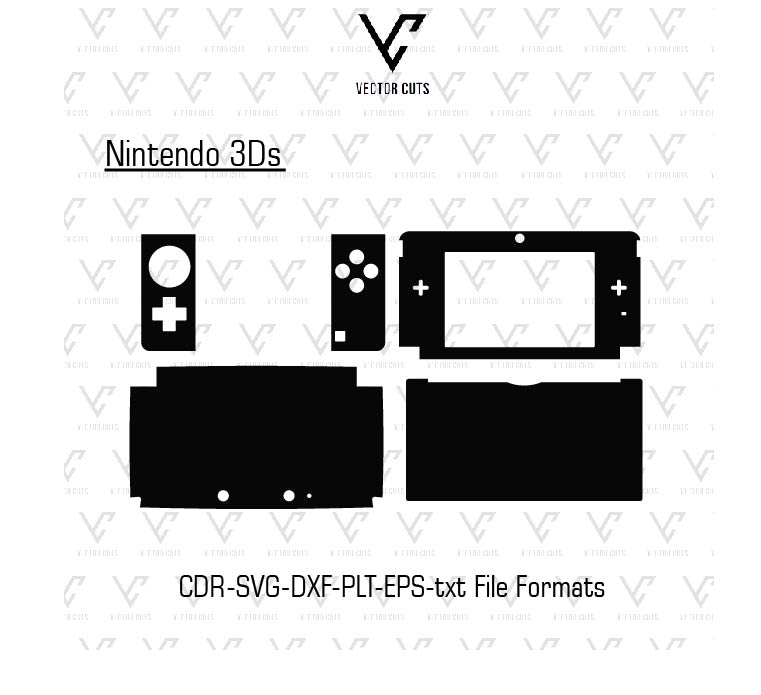
The Nintendo 3Ds Vinyl Skin Template Vector by VectorCuts is a professionally designed digital cut template that was created to assist in creating custom vinyl skins for Nintendo 3Ds gaming systems. The templates provide precisely drawn vector shapes which allow business owners, designers, as well as DIY artists to make top-quality skins that are perfect for.
Instead of measuring the machine manually or drawing patterns by hand, this template will give users precise cut paths that are pre-designed to use with Nintendo 3Ds consoles. Utilizing this template, you’ll be able to easily design your own custom skins printed on vinyl and then cut them with an automated vinyl cutter.
If you own your own customized skin shop or a vinyl printing company, gaming store, or just love creating the skins for your device,s this template can make your entire procedure much easier and efficient.
This template works with popular design software as well as vinyl cutting equipment, which allows people to make top-quality Nintendo 3Ds skins with little effort.
Product Description
Nintendo 3Ds Vinyl Skin Template Vector is a precise digital design software that has been created for designers to create customized vinyl skins for Nintendo 3Ds gaming consoles. Each template has been carefully created to be a perfect match for the shape and size of the device to ensure that the skins perfectly fit on the screen, buttons, and edges.
This template takes away the requirement for complex measurement or manual tracing. Instead, you are able to concentrate on designing unique and distinctive graphic designs while the template manages the technical details.
As the vector file is vector-based, it can be altered, changed, or modified with no loss of quality. Designers can apply images, colors, textures,s and logos as well as games directly to the template prior to cutting vinyl.
The template can be used for both print-and-cut and cut-only workflows and is therefore ideal for various techniques used by the vinyl skin industry.
Clean and organized layers, as well as clear vector paths.. The Nintendo 3Ds Vinyl Skin Template from VectorCuts simplifies the process, starting from the design stage to cutting and installation.
Why Use a Nintendo 3Ds Vinyl Skin Template?
Making vinyl skins with no appropriate template is laborious and costly. An expertly designed template can simplify all of the procedure.
Saves Time
Instead of taking measurements yourself, the template gives outline templates that can be used to match the model perfectly.
Accurate Cutting
Clean vector cut lines ensure your vinyl cutter produces precise skin pieces.
Easy Customization
It is easy to apply graphics, as well as textures and branding, to make distinctive skins.
Professional Results
Templates aid in ensuring that the final product is elegant and professional.
Perfect for Designers and Vinyl Businesses
This Nintendo 3Ds Vinyl Skin Template is suitable for all kinds of players.
Vinyl Skin Businesses
If you own your own online shop or print shops, this template lets users design unique skins specifically for Nintendo 3Ds devices, as well as increase the number of products you sell.
Graphic Designers
Designers can make use of this template to design gaming skins that feature unique artwork and design styles.
Print Shops
Printing firms can supply customized Nintendo 3Ds Skins as an added service to gamers.
DIY Creators
People who own vinyl cutters may make skins that can be used for personal use.
Compatible Design Software
This template was designed to integrate with a variety of commonly used design programs utilized by vinyl companies and designers.
Compatible software can include:
* Adobe Illustrator
* CorelDRAW
* Inkscape
* Cricut Design Space
* Silhouette Studio
They allow you to modify the templates easily, as well as prepare the designs for cutting.
Compatible Cutting Machines
The Nintendo 3Ds Vinyl Skin Template works with all vinyl cutting equipment in use today.
Supported machines include:
* Cricut Maker
* Cricut Explore Series
* Silhouette Cameo
* Silhouette Portrait
* Graphtec cutters
* Roland vinyl cutters
* GCC cutters
The machines are able to precisely track the template cut lines in order to create clear vinyl skins.
File Formats Included
The download bundle includes a variety of vector file formats that guarantee compatibility with various cutters and design tools.
Common file formats comprise:
* AI (Adobe Illustrator)
* EPS
* SVG
* DXF
* PDF
These formats enable you to use the templates for almost any style setting.
How the Nintendo 3Ds Skin Template Works
The template can be used in a simple and easy way.
Step 1 – Download the Template
When you purchase the template through VectorCuts Download the template on your computer.
Step 2 – Open the Template
The file can be opened in the program of your choice, for example, Illustrator, as well as CorelDRAW.
Step 3 – Add Your Design
Include patterns, graphics, and textures to design your own personal Nintendo 3Ds skin style.
Step 4 – Prepare the Cut File
Make sure that the cut lines are separate from the layer of design to ensure accurate cutting.
Step 5 – Cut the Vinyl
Place your vinyl in an automated cutting device and cut out the skin pieces following the design.
Step 6 – Apply the Skin
Be sure to align the pieces of vinyl and then attach them to the Nintendo 3Ds device.
Compatible Vinyl Materials
This Nintendo 3Ds skin template is compatible with various types of vinyl, based on the desired look you’d like to achieve.
Matte Vinyl
Matte vinyl gives a soft, reflective, non-reflective surface that many gamers like.
Gloss Vinyl
Gloss vinyl provides a glossy appearance that lets colours appear vivid.
Carbon Fiber Vinyl
Carbon fiber texture gives the gaming device a luxurious appearance.
Brushed Metal Vinyl
The material gives an appearance of metal and gives it a modern look of tech.
Printable Vinyl
Vinyl that is printable lets you create custom designs and artwork before you cut.
Benefits of Using Nintendo 3Ds Vinyl Skins
Vinyl skins offer a variety of benefits to gamers as well as device owners.
Protects the Device
Skins made of vinyl help to safeguard the surface of devices from everyday wear and scratch marks.
Personalization
Gamers are able to customize their devices with distinctive graphics and designs.
Easy to Remove
Vinyl skins can be cleaned without leaving a residue if high-quality material is used.
Enhances Appearance
The custom skin can help create a device that looks stylish and distinct.
Popular Nintendo 3Ds Skin Design Ideas
If you are planning to design custom skins for your customers, here are some designs.
Gaming-Themed Skins
Skins that are inspired by gaming culture, modern styles, or even cyberpunk style.
Minimalist Skins
Certain people prefer simpler designs, like simple colors or delicate textures.
Anime and Pop Culture
Pop culture and animation artworks are very well-liked by gamers.
Custom Branding
Business owners can use their logos for customized skins for promotional purposes or with branded designs.
Instant Digital Download
After you have completed your purchase The Nintendo 3Ds Vinyl Template Vector is now available in an immediate electronic download.
It means that you can begin creating and releasing skins right away without waiting until shipment.
The designs can be edited and are compatible in conjunction with the majority of design software and cutting vinyl machines.
Why Choose VectorCuts?
VectorCuts is well-known for its top-quality templates for devices, companies, and artists.
The templates they create are designed by paying attention to the smallest details and optimized for production workflows.
The benefits of using VectorCuts Templates include:
* Accurate measurement
* Clean vector cut paths
* Organized design layers
* Compatible with cutting machines
* Files are easy to edit
It allows users to create professional skins in a short time and with ease.
FAQs
What is the Nintendo 3Ds Vinyl Skin Template Vector?
It’s a vector that can be used to create as well as cut out vinyl skins for Nintendo 3Ds gaming consoles.
Is this a physical product?
No. It’s a digital template for downloading, but not a real skin.
What software can I use to edit the template?
You can use Adobe Illustrator, CorelDRAW, Inkscape, Cricut Design Space, and Silhouette Studio.
Can beginners use this template?
Yes. It is designed using smooth layers and sharp cuts, which makes it easy to use for novices.
What machines can cut these files?
The file can be utilized to use vinyl cutters, such as Cricut, Silhouette, Graphtec, Roland, and GCC machines.
Can I sell skins made using this template?
Yes. You are able to design custom vinyl skins for sale by applying your personal concepts.
Does the template include all necessary device sections?
Yes. The design template has all the important areas needed to make an entire Nintendo 3Ds skin for the device.
Final Thoughts
Nintendo game Vinyl Skin Template Vector by VectorCuts is an indispensable device for vinyl-based businesses and fans who wish to design unique skins specifically for Nintendo 3Ds gaming consoles.
With precise measurements, crisp cuts in vectors, and a range of edit options to choose from, the template is easy to use to create top-quality vinyl skins. You can personalize your own gaming equipment or begin selling custom skins on the internet. The template is an effective and efficient solution.
Get started today on your design and develop distinct Nintendo 3Ds skins that blend fashion, protection, and imagination.
Reviews
There are no reviews yet.